Criteria
Contents
Criteria are elements used within the program to categorize both resources and tasks. Tasks require specific criteria, and resources must meet those criteria.
Here's an example of how criteria are used: A resource is assigned the criterion "welder" (meaning the resource fulfills the "welder" category), and a task requires the "welder" criterion to be completed. Consequently, when resources are allocated to tasks using generic allocation (as opposed to specific allocation), workers with the "welder" criterion will be considered. For more information on the different types of allocation, refer to the chapter on resource allocation.
The program allows for several operations involving criteria:
- Criteria administration
- Assigning criteria to resources
- Assigning criteria to tasks
- Filtering entities based on criteria. Tasks and project elements can be filtered by criteria to perform various operations within the program.
This section will only explain the first function, criteria administration. The two types of allocation will be covered later: resource allocation in the "Resource Management" chapter, and filtering in the "Task Planning" chapter.
Criteria Administration
Criteria administration can be accessed through the administration menu:

First-Level Menu Tabs
The specific operation for managing criteria is Manage criteria. This operation allows you to list the criteria available in the system.
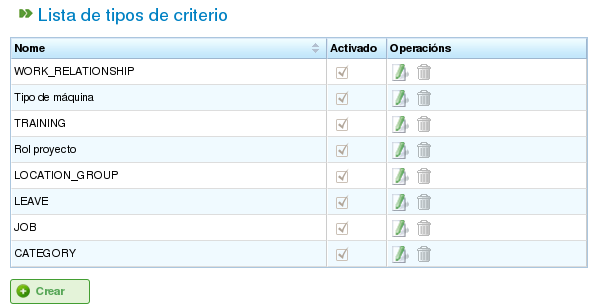
List of Criteria
You can access the create/edit criterion form by clicking the Create button. To edit an existing criterion, click the edit icon.
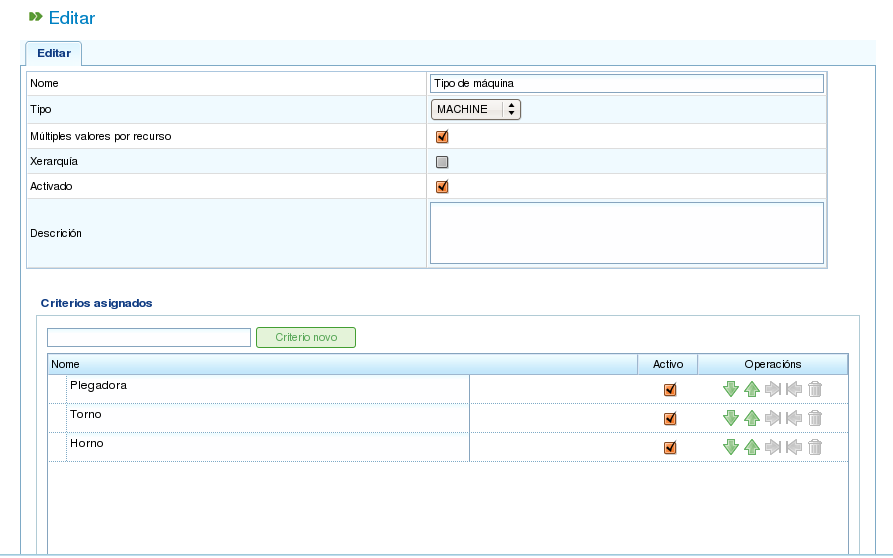
Editing Criteria
The criteria editing form, as shown in the previous image, allows you to perform the following operations:
- Edit the criterion's name.
- Specify whether multiple values can be assigned simultaneously or only one value for the selected criterion type. For example, a resource could fulfill two criteria, "welder" and "lathe operator."
- Specify the criterion type:
- Generic: A criterion that can be used for both machines and workers.
- Worker: A criterion that can only be used for workers.
- Machine: A criterion that can only be used for machines.
- Indicate whether the criterion is hierarchical. Sometimes, criteria need to be treated hierarchically. For example, assigning a criterion to an element does not automatically assign it to elements derived from it. A clear example of a hierarchical criterion is "location." For instance, a person designated with the location "Galicia" will also belong to "Spain."
- Indicate whether the criterion is authorized. This is how users deactivate criteria. Once a criterion has been created and used in historical data, it cannot be changed. Instead, it can be deactivated to prevent it from appearing in selection lists.
- Describe the criterion.
- Add new values. A text entry field with the New criterion button is located in the second part of the form.
- Edit the names of existing criteria values.
- Move criteria values up or down in the list of current criteria values.
- Remove a criterion value from the list.
The criteria administration form follows the form behavior described in the introduction, offering three actions: Save, Save and Close, and Close.