Progress
Contents
Project progress indicates the degree to which the estimated completion time of the project is being met. Task progress indicates the degree to which the task is being completed according to its estimated completion.
Generally, progress cannot be measured automatically. A staff member with experience or a checklist must determine the degree of completion for a task or project.
It's important to note the distinction between the hours assigned to a task or project and the progress of that task or project. While the number of hours used may be more or less than expected, the project may be ahead of or behind its estimated completion on the monitored day. Several situations can arise from these two measurements:
- Fewer hours consumed than expected, but the project is behind schedule: Progress is lower than estimated for the monitored day.
- Fewer hours consumed than expected, and the project is ahead of schedule: Progress is higher than estimated for the monitored day.
- More hours consumed than expected, and the project is behind schedule: Progress is lower than estimated for the monitored day.
- More hours consumed than expected, but the project is ahead of schedule: Progress is higher than estimated for the monitored day.
The planning view allows you to compare these situations by using information about the progress made and the hours used. This chapter will explain how to enter information to monitor progress.
The philosophy behind progress monitoring is based on users defining the level at which they want to monitor their projects. For example, if users want to monitor projects, they only need to enter information for level-1 elements. If they want more precise monitoring at the task level, they must enter progress information at lower levels. The system will then aggregate the data upward through the hierarchy.
Managing Progress Types
Companies have varying needs when monitoring project progress, particularly the tasks involved. Therefore, the system includes "progress types." Users can define different progress types to measure a task's progress. For example, a task can be measured as a percentage, but this percentage can also be translated into progress in Tonnes based on the agreement with the client.
A progress type has a name, a maximum value, and a precision value:
- Name: A descriptive name that users will recognize when selecting the progress type. This name should clearly indicate what kind of progress is being measured.
- Maximum Value: The maximum value that can be established for a task or project as the total progress measurement. For example, if you're working with Tonnes and the normal maximum is 4000 tonnes, and no task will ever require more than 4000 tonnes of any material, then 4000 would be the maximum value.
- Precision Value: The increment value allowed for the progress type. For example, if progress in Tonnes is to be measured in whole numbers, the precision value would be 1. From that point on, only whole numbers can be entered as progress measurements (e.g., 1, 2, 300).
The system has two default progress types:
- Percentage: A general progress type that measures the progress of a project or task based on an estimated completion percentage. For example, a task is 30% complete out of the 100% estimated for a specific day.
- Units: A general progress type that measures progress in units without specifying the type of unit. For example, a task involves creating 3000 units, and the progress is 500 units out of the total of 3000.
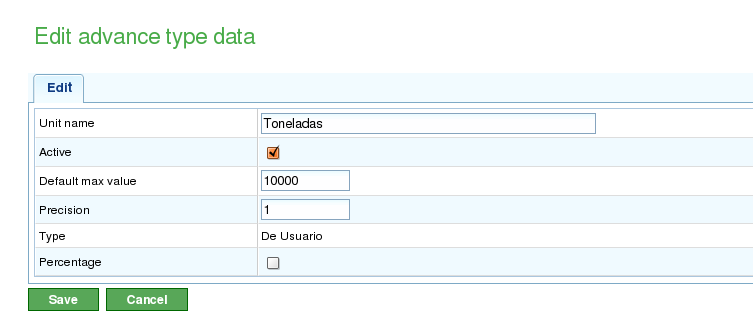
Administration of Progress Types
Users can create new progress types as follows:
- Go to the "Administration" section.
- Click the "Manage types of progress" option in the second-level menu.
- The system will display a list of existing progress types.
- For each progress type, users can:
- Edit
- Delete
- Users can then create a new progress type.
- When editing or creating a progress type, the system displays a form with the following information:
- Name of the progress type.
- Maximum value allowed for the progress type.
- Precision value for the progress type.
Entering Progress Based on Type
Progress is entered for project elements, but it can also be entered using a shortcut from the planning tasks. Users are responsible for deciding which progress type to associate with each project element.
Users can enter a single, default progress type for the entire project.
Before measuring progress, users must associate the chosen progress type with the project. For example, they might choose percentage progress to measure progress on the entire task or an agreed progress rate if progress measurements agreed upon with the client will be entered in the future.
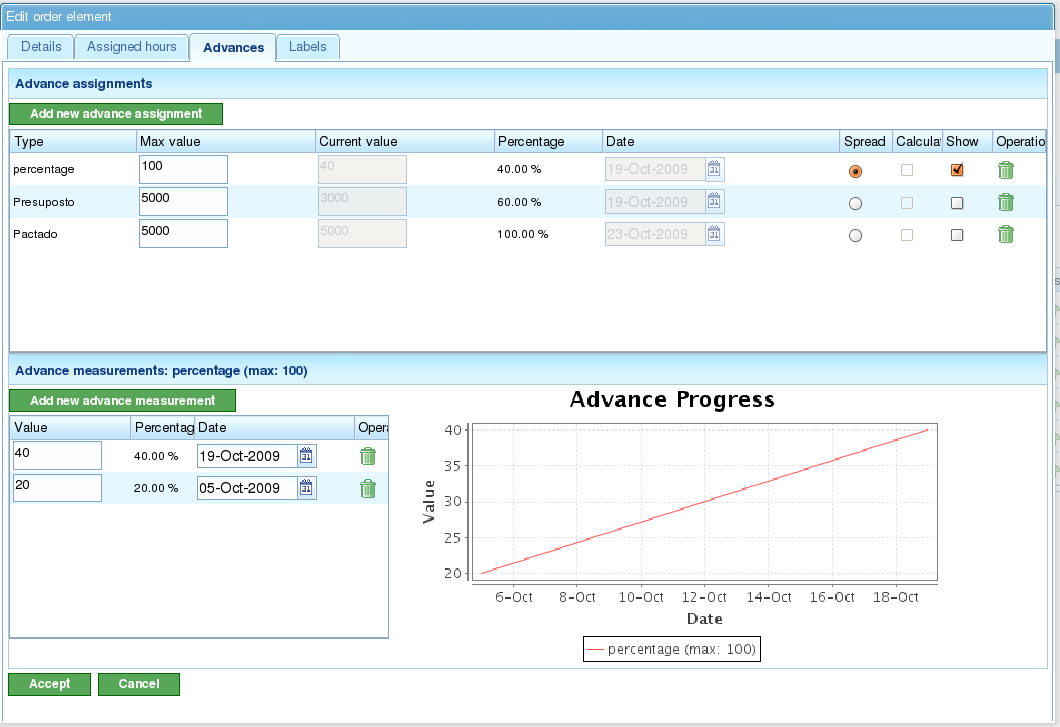
Progress Entry Screen with Graphic Visualization
To enter progress measurements:
- Select the progress type to which the progress will be added. * If no progress type exists, a new one must be created.
- In the form that appears under the "Value" and "Date" fields, enter the absolute value of the measurement and the date of the measurement.
- The system automatically stores the entered data.
Comparing Progress for a Project Element
Users can graphically compare the progress made on projects with the measurements taken. All progress types have a column with a check button ("Show"). When this button is selected, the progress chart of measurements taken is displayed for the project element.
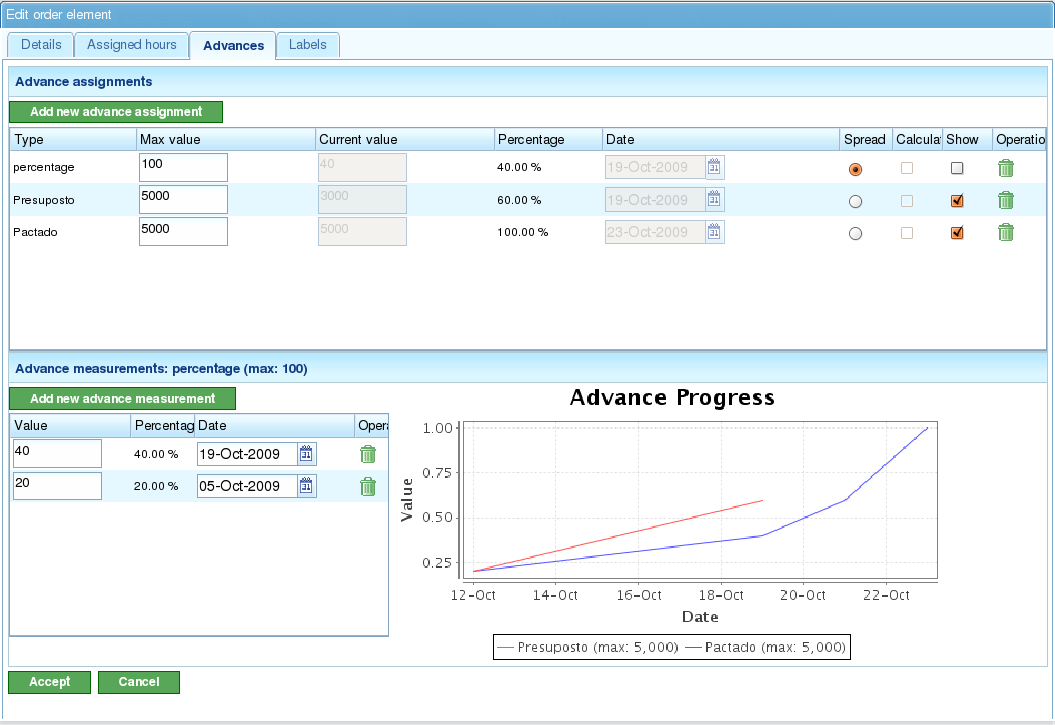
Comparison of Several Progress Types