Resource Assignment
Contents
Resource assignment is one of the program's most important features and can be carried out in two different ways:
- Specific assignment
- Generic assignment
Both types of assignment are explained in the following sections.
To perform either type of resource assignment, the following steps are necessary:
- Go to the planning view of a project.
- Right-click on the task to be planned.
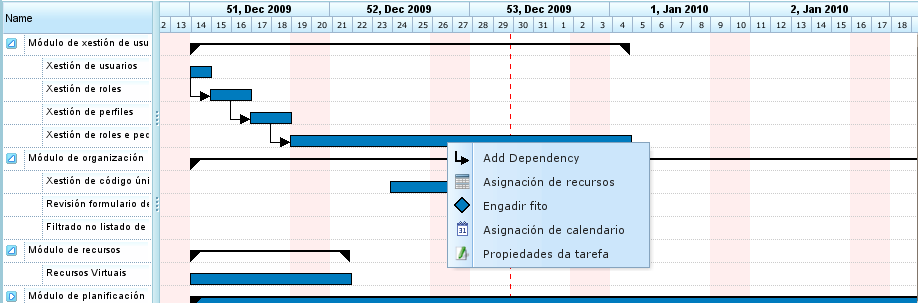
Resource Assignment Menu
- The program displays a screen with the following information:
- List of Criteria to be Fulfilled: For each hour group, a list of required criteria is shown.
- Task Information: The start and end dates of the task.
- Type of Calculation: The system allows users to choose the strategy for calculating assignments:
- Calculate Number of Hours: This calculates the number of hours required from the assigned resources, given an end date and a number of resources per day.
- Calculate End Date: This calculates the end date of the task based on the number of resources assigned to the task and the total number of hours required to complete the task.
- Calculate Number of Resources: This calculates the number of resources required to finish the task by a specific date, given a known number of hours per resource.
- Recommended Assignment: This option allows the program to gather the criteria to be fulfilled and the total number of hours from all hour groups, and then recommend a generic assignment. If a prior assignment exists, the system deletes it and replaces it with the new one.
- Assignments: A list of assignments that have been made. This list shows the generic assignments (the number will be the list of fulfilled criteria, and the number of hours and resources per day). Each assignment can be explicitly removed by clicking the delete button.
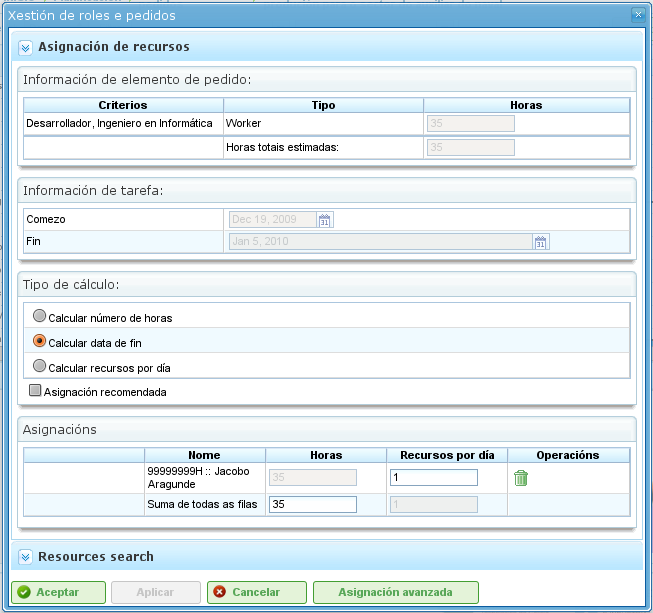
Resource Assignment
- Users select "Search resources."
- The program displays a new screen consisting of a criteria tree and a list of workers who fulfill the selected criteria on the right:
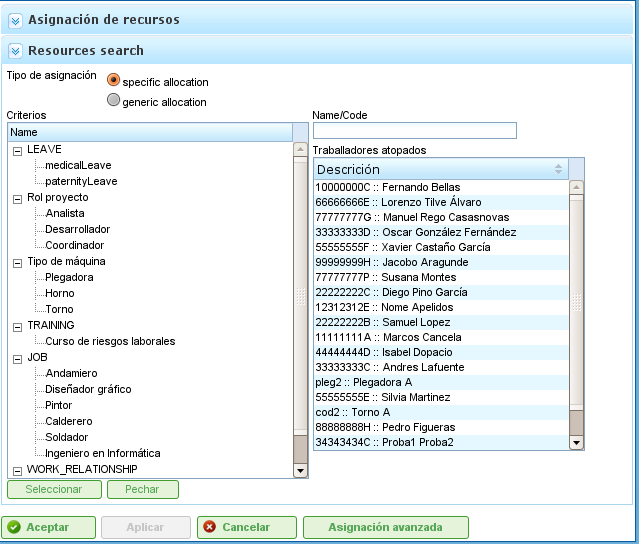
Resource Assignment Search
- Users can select:
- Specific Assignment: See the "Specific Assignment" section for details on this option.
- Generic Assignment: See the "Generic Assignment" section for details on this option.
- Users select a list of criteria (generic) or a list of workers (specific). Multiple selections can be made by pressing the "Ctrl" key while clicking each worker/criterion.
- Users then click the "Select" button. It's important to remember that if a generic assignment is not selected, users must choose a worker or machine to perform the assignment. If a generic assignment is selected, it is sufficient for users to choose one or more criteria.
- The program then displays the selected criteria or resource list in the list of assignments on the original resource assignment screen.
- Users must choose the hours or resources per day, depending on the assignment method used in the program.
Specific Assignment
This is the specific assignment of a resource to a project task. In other words, the user decides which specific worker (by name and surname) or machine must be assigned to a task.
Specific assignment can be carried out on the screen shown in this image:
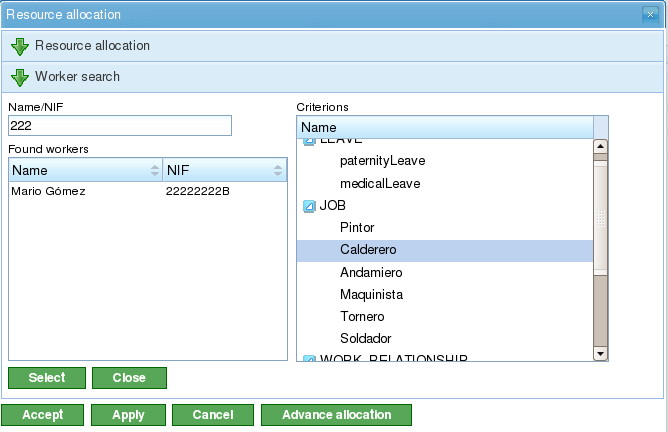
Specific Resource Assignment
When a resource is specifically assigned, the program creates daily assignments based on the percentage of daily assigned resources selected, after comparing it with the available resource calendar. For example, an assignment of 0.5 resources for a 32-hour task means that 4 hours per day are assigned to the specific resource to complete the task (assuming a working calendar of 8 hours per day).
Specific Machine Assignment
Specific machine assignment functions in the same way as worker assignment. When a machine is assigned to a task, the system stores a specific assignment of hours for the chosen machine. The main difference is that the system searches the list of assigned workers or criteria at the moment the machine is assigned:
- If the machine has a list of assigned workers, the program chooses from those that are required by the machine, based on the assigned calendar. For example, if the machine calendar is 16 hours per day and the resource calendar is 8 hours, two resources are assigned from the list of available resources.
- If the machine has one or more assigned criteria, generic assignments are made from among the resources that fulfill the criteria assigned to the machine.
Generic Assignment
Generic assignment occurs when users do not choose resources specifically but leave the decision to the program, which distributes the loads among the company's available resources.

Generic Resource Assignment
The assignment system uses the following assumptions as a basis:
- Tasks have criteria that are required from resources.
- Resources are configured to fulfill criteria.
However, the system does not fail when criteria have not been assigned, but when all resources fulfill the non-requirement of criteria.
The generic assignment algorithm functions as follows:
- All resources and days are treated as containers where daily assignments of hours fit, based on the maximum assignment capacity in the task calendar.
- The system searches for the resources that fulfill the criterion.
- The system analyzes which assignments currently have different resources that fulfill criteria.
- The resources that fulfill the criteria are chosen from those that have sufficient availability.
- If freer resources are not available, assignments are made to the resources that have less availability.
- Over-assignment of resources only begins when all the resources that fulfill the respective criteria are 100% assigned, until the total amount required to carry out the task is attained.
Generic Machine Assignment
Generic machine assignment functions in the same way as worker assignment. For example, when a machine is assigned to a task, the system stores a generic assignment of hours for all machines that fulfill the criteria, as described for resources in general. However, in addition, the system performs the following procedure for machines:
- For all machines chosen for generic assignment:
- It collects the machine's configuration information: alpha value, assigned workers, and criteria.
- If the machine has an assigned list of workers, the program chooses the number required by the machine, depending on the assigned calendar. For example, if the machine calendar is 16 hours per day and the resource calendar is 8 hours, the program assigns two resources from the list of available resources.
- If the machine has one or more assigned criteria, the program makes generic assignments from among the resources that fulfill the criteria assigned to the machine.
Advanced Assignment
Advanced assignments allow users to design assignments that are automatically carried out by the application to personalize them. This procedure allows users to manually choose the daily hours that are dedicated by resources to assigned tasks or define a function that is applied to the assignment.
The steps to follow to manage advanced assignments are:
- Go to the advanced assignment window. There are two ways to access advanced assignments:
- Go to a specific project and change the view to advanced assignment. In this case, all the tasks on the project and assigned resources (specific and generic) will be shown.
- Go to the resource assignment window by clicking the "Advanced assignment" button. In this case, the assignments that show the resources (generic and specific) assigned to a task will be shown.
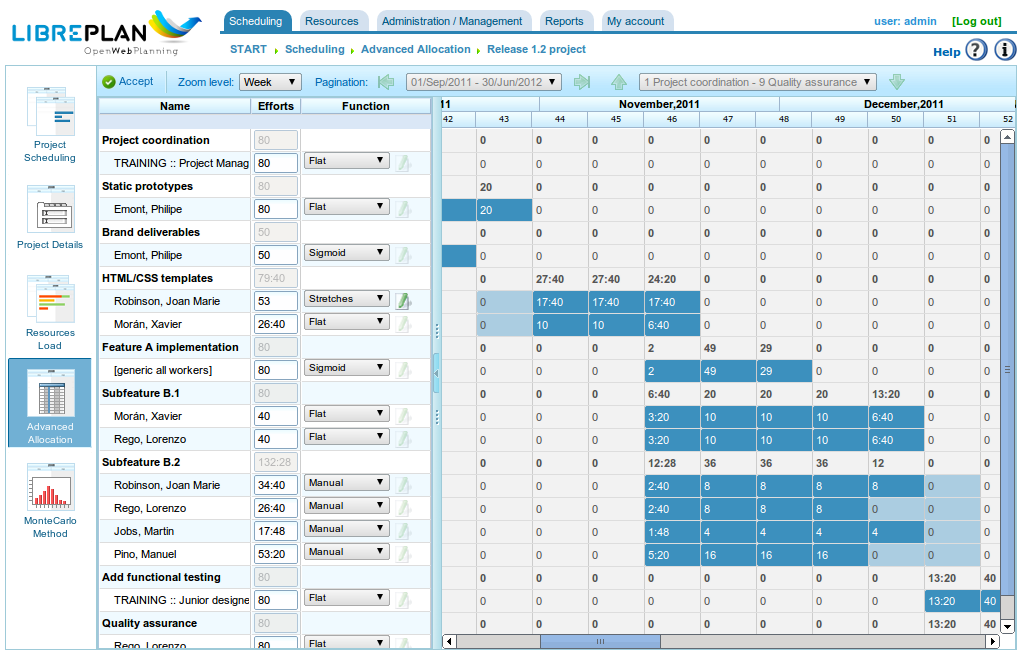
Advanced Resource Assignment
- Users can choose the desired zoom level:
- Zoom Levels Greater Than One Day: If users change the assigned hour value to a week, month, four-month, or six-month period, the system distributes the hours linearly across all days throughout the chosen period.
- Daily Zoom: If users change the assigned hour value to a day, these hours only apply to that day. Consequently, users can decide how many hours they want to assign per day to task resources.
- Users can choose to design an advanced assignment function. To do so, users must:
- Choose the function from the selection list that appears next to each resource and click "Configure."
- The system displays a new window if the chosen function needs to be specifically configured. Supported functions:
- Segments: A function that allows users to define segments to which a polynomial function is applied. The function per segment is configured as follows:
- Date: The date on which the segment ends. If the following value (length) is established, the date is calculated; alternatively, length is calculated.
- Defining the Length of Each Segment: This indicates what percentage of the task's duration is required for the segment.
- Defining the Amount of Work: This indicates what workload percentage is expected to be completed in this segment. The quantity of work must be incremental. For example, if there is a 10% segment, the next one must be larger (for example, 20%).
- Segment Graphs and Accumulated Loads.
- Segments: A function that allows users to define segments to which a polynomial function is applied. The function per segment is configured as follows:
- Users then click "Accept."
- The program stores the function and applies it to the daily resource assignments.
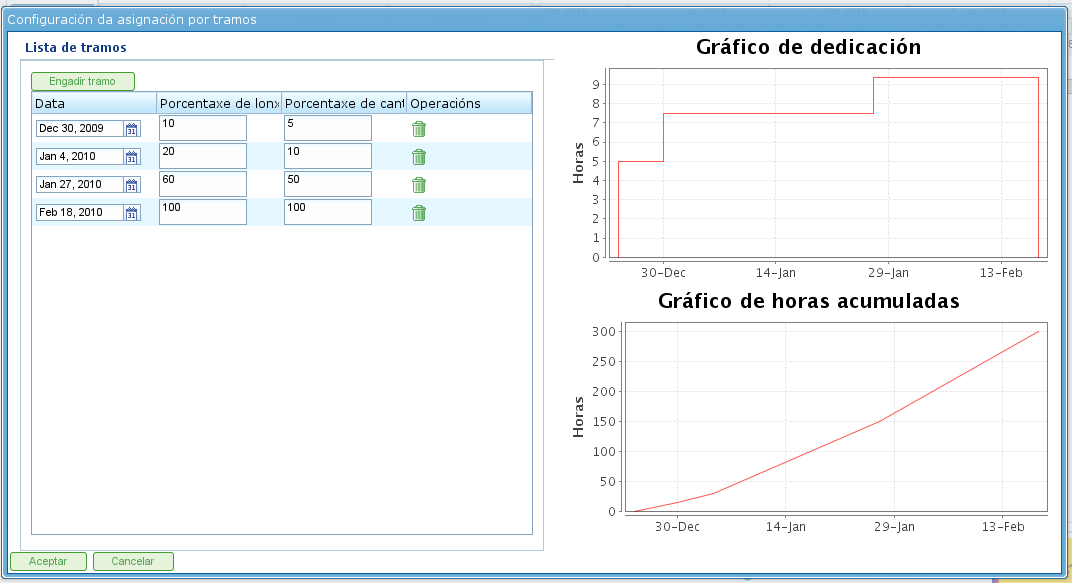
Configuration of the Segment Function