Materials Management
Contents
Administration of Materials
Users can manage a basic database of materials, organized by categories.
Categories are containers to which specific materials and other categories can be assigned. They are stored in a hierarchical tree structure, as materials can belong to leaf categories or intermediary categories.
To manage categories, users must follow these steps:
- Go to the "Administration -> Materials" option.
- The program displays a tree of categories.
- Enter a category name in the text box and then click "Add."
- The program adds the category to the tree.
To insert a category into the category tree, users must first select the parent category in the tree and then click "Add."
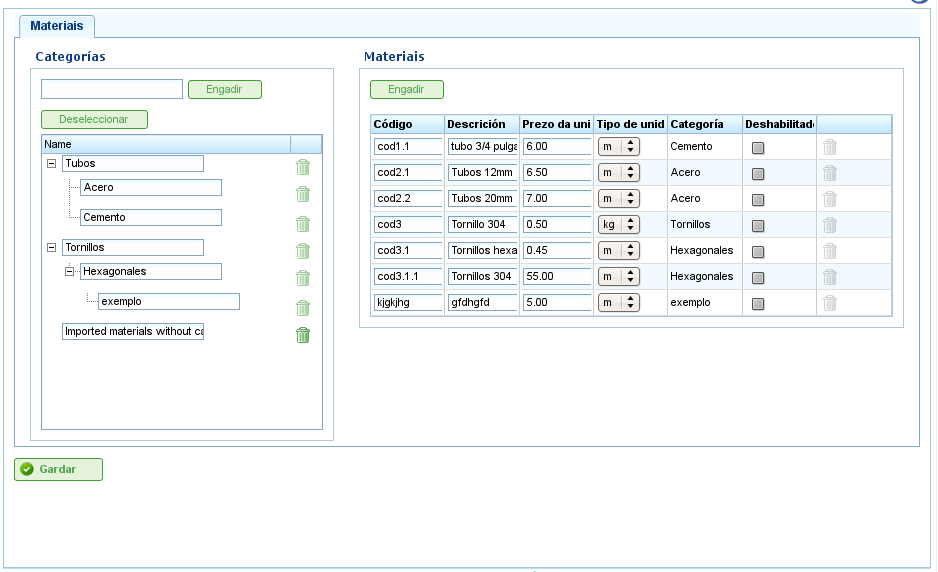
Material Administration Screen
To manage materials, users must follow these steps:
- Select the category to which materials are to be added and click "Add" to the right of "Materials."
- The program adds a new empty row with fields to enter details about the material:
- Code: Material type code (this can be the external code from an ERP).
- Description: Description of the material.
- Unit Price: Unit price of each piece of material.
- Unit: Unit used to measure each unit of material.
- Category: Category to which the material belongs.
- Availability: Indicates whether or not the material is active.
- Users complete the fields and click "Save."
The assignment of materials to project elements is explained in the chapter on "Projects."